13.3 自定义端点
在项目中,我们可能需要根据实际情况来自定义监控端点,特别是一些和业务相关的监控端点。
13.3.1 自定义健康监控端点
自定义健康监测的端点有两种方式:
- 继承AbstractHealthIndicator类;
- 实现HealthIndicator接口。
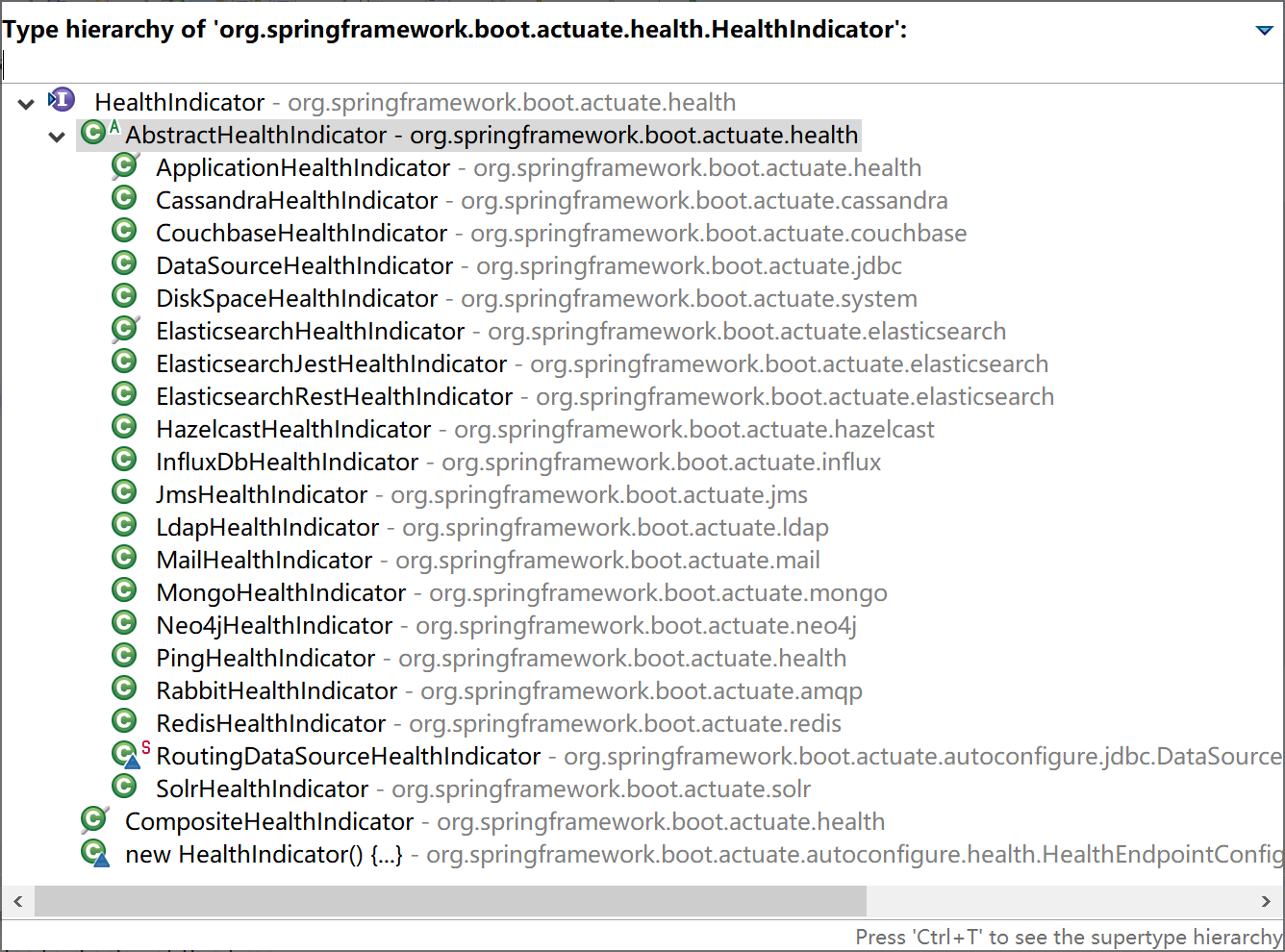
通过查看HealthIndicator接口源码,可以看到,系统内置的众多健康检测端点都是从AbstractHealthIndicator抽象类继承而来的。
在spring-boot-actuator项目的application.yml配置文件中添加Actuator健康监控总是显示详细信息配置。
# Actuator 端口配置
management:
  endpoint:
    health:
      show-details: always
13.3.1.1 继承AbstractHealthIndicator类
创建一个监控端点类CustomHealthEndPoint继承AbstractHealthIndicator类。
在其中获取磁盘使用信息并输出监控信息。
package com.example.actuator.custom;

import java.io.File;

import org.springframework.boot.actuate.health.AbstractHealthIndicator;
import org.springframework.boot.actuate.health.Health.Builder;
import org.springframework.stereotype.Component;

/**
 * 自定义监控示例,监控磁盘容量
 * @author Kevin
 *
 */
@Component("myHealth")
public class CustomHealthEndPoint extends AbstractHealthIndicator {

    @Override
    protected void doHealthCheck(Builder builder) throws Exception {
        File[] rootFiles = File.listRoots();
        if (rootFiles != null && rootFiles.length != 0) {
            long total = 0, free = 0;
            for (File file : rootFiles) {
                total += file.getTotalSpace(); // 磁盘总量
                free += file.getUsableSpace(); // 可用容量
            }
            long user = total - free; // 已用容量
            double userRate = total == 0 ? 0 : ((double) user / total);// 磁盘利用率
            builder.up()
                .withDetail("磁盘总量", total) // 这里是你要显示的具体健康监测信息
                .withDetail("可用容量", free)
                .withDetail("利用率%", userRate * 100).build();
        } else {
            builder.down().build();
        }
    }

}
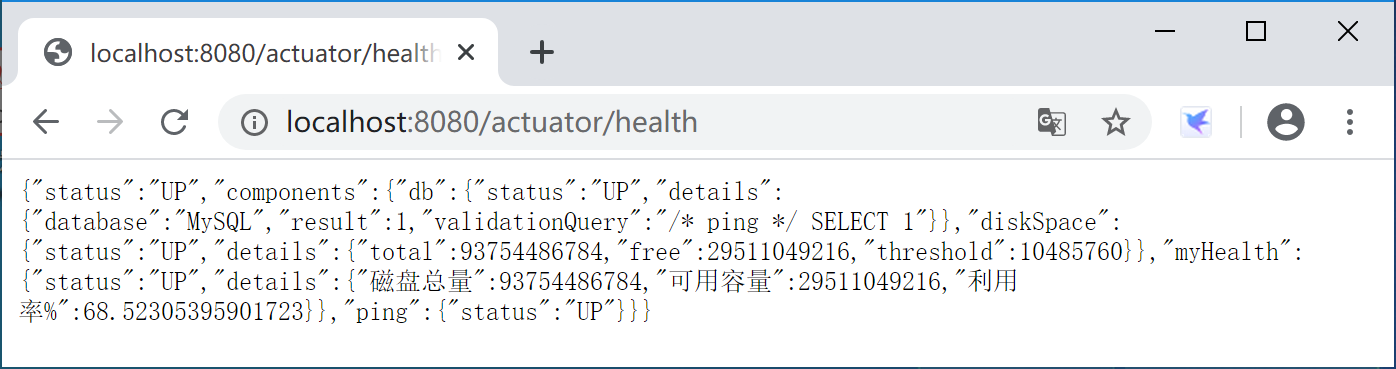
运行Spring Boot应用程序,访问监控监控端点http://localhost:8080/actuator/health,查看自定义监控端点输出的监控信息。
13.3.1.2 实现HealthIndicator接口
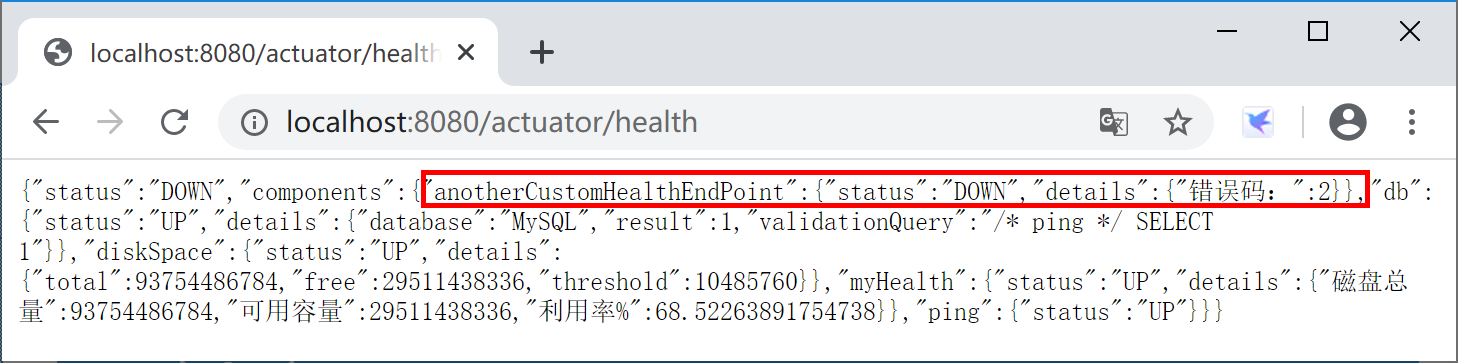
创建一个AnotherCustomHealthEndPoint类,实现HealthIndicator接口。实现public Health health()方法,在其中生成一个随机数,然后根据这个随机数是否为零来输出健康状态。
package com.example.actuator.custom;

import java.util.Random;

import org.springframework.boot.actuate.health.Health;
import org.springframework.boot.actuate.health.HealthIndicator;
import org.springframework.stereotype.Component;

@Component("anotherCustomHealthEndPoint")
public class AnotherCustomHealthEndPoint implements HealthIndicator {

    @Override
    public Health health() {
        int errorCode = new Random().nextInt(5); // 定义一个错误代码 随机产生
        if (errorCode != 0) {
            return Health.down().withDetail("错误码:", errorCode).build();
        } else {
            return Health.up().withDetail("正确代码:", errorCode).build();
        }
    }

}
运行Spring Boot应用程序,访问监控监控端点http://localhost:8080/actuator/health,查看自定义监控端点输出的监控信息。
13.3.2 自定义Metrics端点
自定义Metrics是通过实现MeterBinder接口完成的。
新建一个DiskspaceMetrics类,实现MeterBinder接口,代码如下:
package com.example.actuator.custom;

import java.io.File;

import org.springframework.stereotype.Component;

import io.micrometer.core.instrument.Gauge;
import io.micrometer.core.instrument.MeterRegistry;
import io.micrometer.core.instrument.binder.MeterBinder;

@Component("diskspaceMetrics")
public class DiskspaceMetrics implements MeterBinder {
    private File rootFilePath;

    public DiskspaceMetrics() {
        this.rootFilePath = new File(".");
    }

    @Override
    public void bindTo(MeterRegistry registry) {
        Gauge.builder("磁盘已用容量", rootFilePath, File::getTotalSpace).register(registry);
        Gauge.builder("磁盘剩余容量", rootFilePath, File::getFreeSpace).register(registry);
        Gauge.builder("磁盘使用率", rootFilePath, c -> {
            long totalDiskSpace = rootFilePath.getTotalSpace();
            if (totalDiskSpace == 0) {
                return 0.0;
            }
            long usedDiskSpace = totalDiskSpace - rootFilePath.getFreeSpace();
            return (double) usedDiskSpace / totalDiskSpace * 100;
        }).register(registry);
    }

}
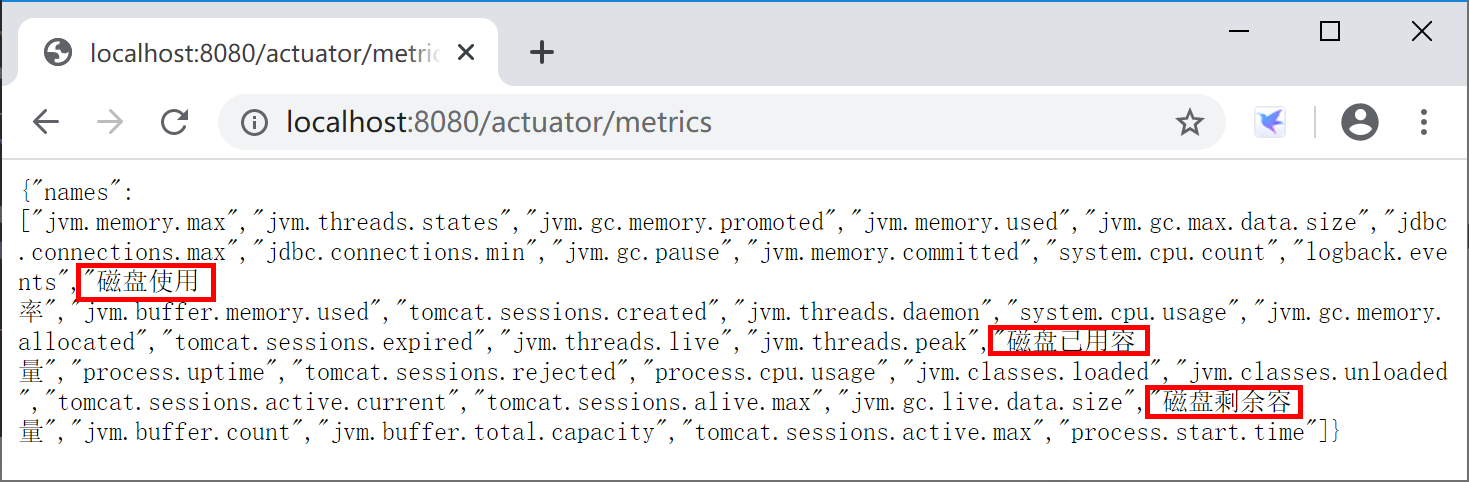
运行Spring Boot应用程序,访问监控监控端点http://localhost:8080/actuator/metrics,查看自定义监控端点输出的监控信息。
13.3.3 完全自定义端点
我们也可以通过Spring Boot提供的@Endpoint、 @ReadOperation、@WriteOperation、@DeleteOperation注解完全自定义监控端点,例如和业务运行状态相关的端点。
创建一个PersonEndpoint类:
package com.example.actuator.custom;

import java.util.ArrayList;
import java.util.HashMap;
import java.util.List;
import java.util.Map;

import org.springframework.boot.actuate.endpoint.annotation.Endpoint;
import org.springframework.boot.actuate.endpoint.annotation.ReadOperation;
import org.springframework.boot.actuate.endpoint.annotation.Selector;
import org.springframework.boot.actuate.endpoint.annotation.WriteOperation;
import org.springframework.stereotype.Component;

@Endpoint(id = "person")
@Component
public class PersonEndpoint {

    private final Map<String, Person> people = new HashMap<>();

    PersonEndpoint() {
        this.people.put("kevin", new Person("Kevin Zhang"));
        this.people.put("roy", new Person("Roy Zhang"));
        this.people.put("lily", new Person("Lily Huang"));
    }

    @ReadOperation
    public List<Person> getAll() {
        return new ArrayList<>(this.people.values());
    }

    @ReadOperation
    public Person getPerson(@Selector String person) {
        return this.people.get(person);
    }

    @WriteOperation
    public void updatePerson(@Selector String name, String person) {
        this.people.put(name, new Person(person));
    }

    public static class Person {
        private String name;

        Person(String name) {
            this.name = name;
        }

        public String getName() {
            return this.name;
        }

        public void setName(String name) {
            this.name = name;
        }
    }
}
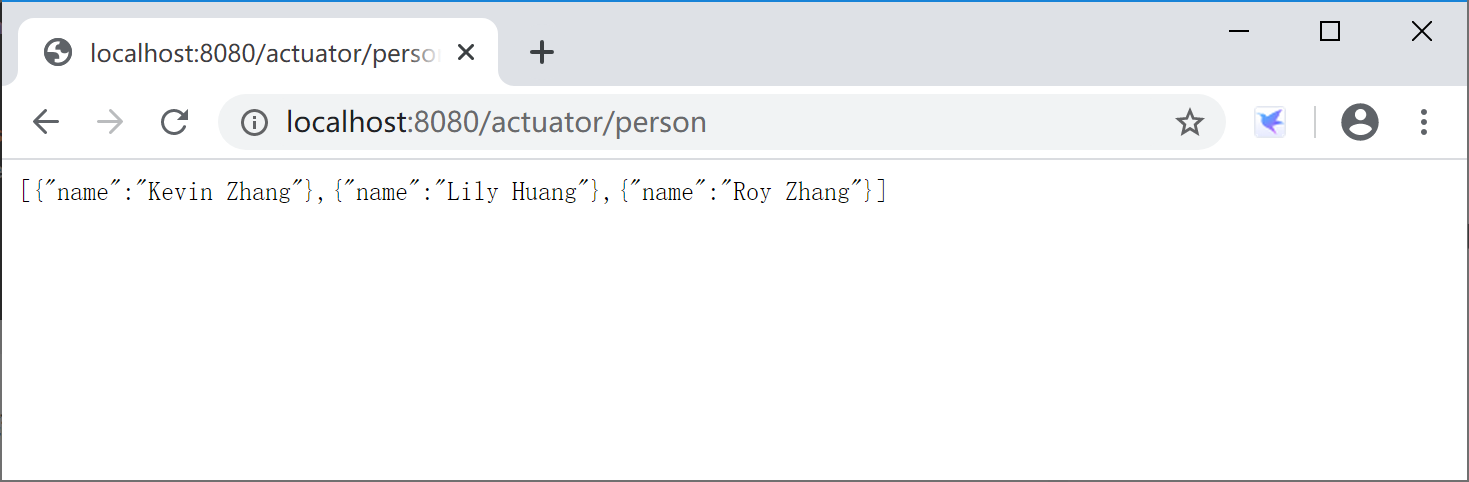
运行Spring Boot应用程序,访问监控监控端点http://localhost:8080/actuator/person,查看自定义监控端点输出的监控信息。
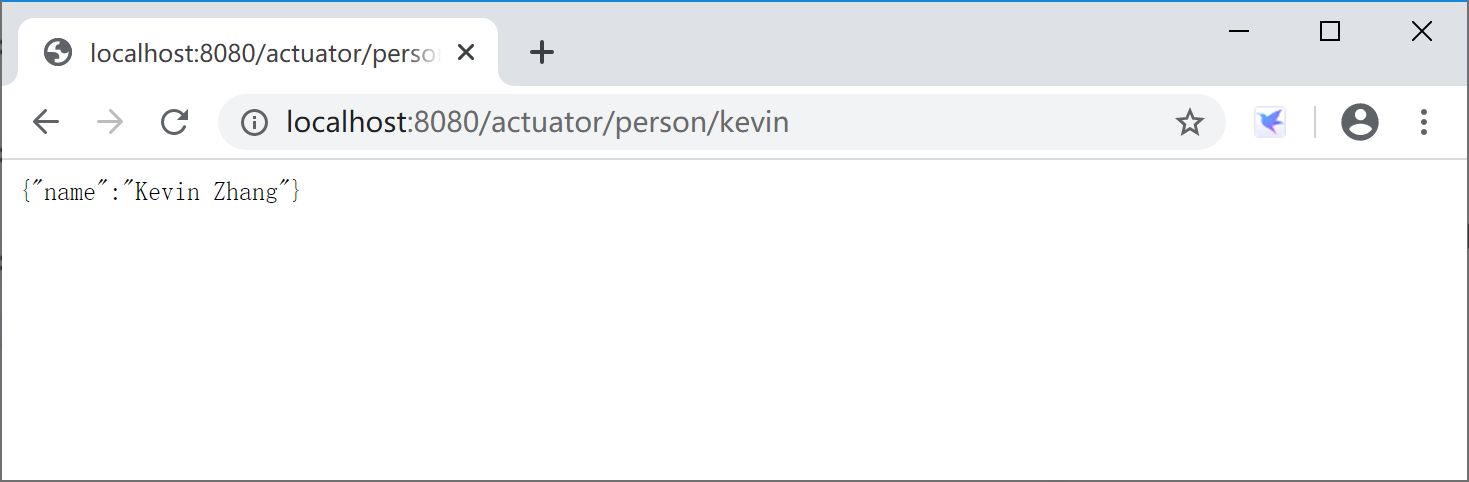
进一步访问http://localhost:8080/actuator/person/kevin,查看针对kevin用户的监控信息。
本小节示例项目代码:
https://github.com/gyzhang/SpringBootCourseCode/tree/master/spring-boot-actuator