8.2 集成MongoDB
Spring Boot对常见的数据源都通过“Spring Data”项目提供了支持,当然,MongoDB就是通过“Spring Data MongoDB”来支持的。所有的Spring Data子项目的使用方式都基本一致:使用模板(提供xxxTemplate类,如MongoTemplate、RedisTemplate)和类似于JPA的Repository类(如MongoRepository接口的SimpleMongoRepository实现类)。
8.2.1 创建项目
在STS中新建项目,选中Spring Web和Spring Data MongoDB依赖。
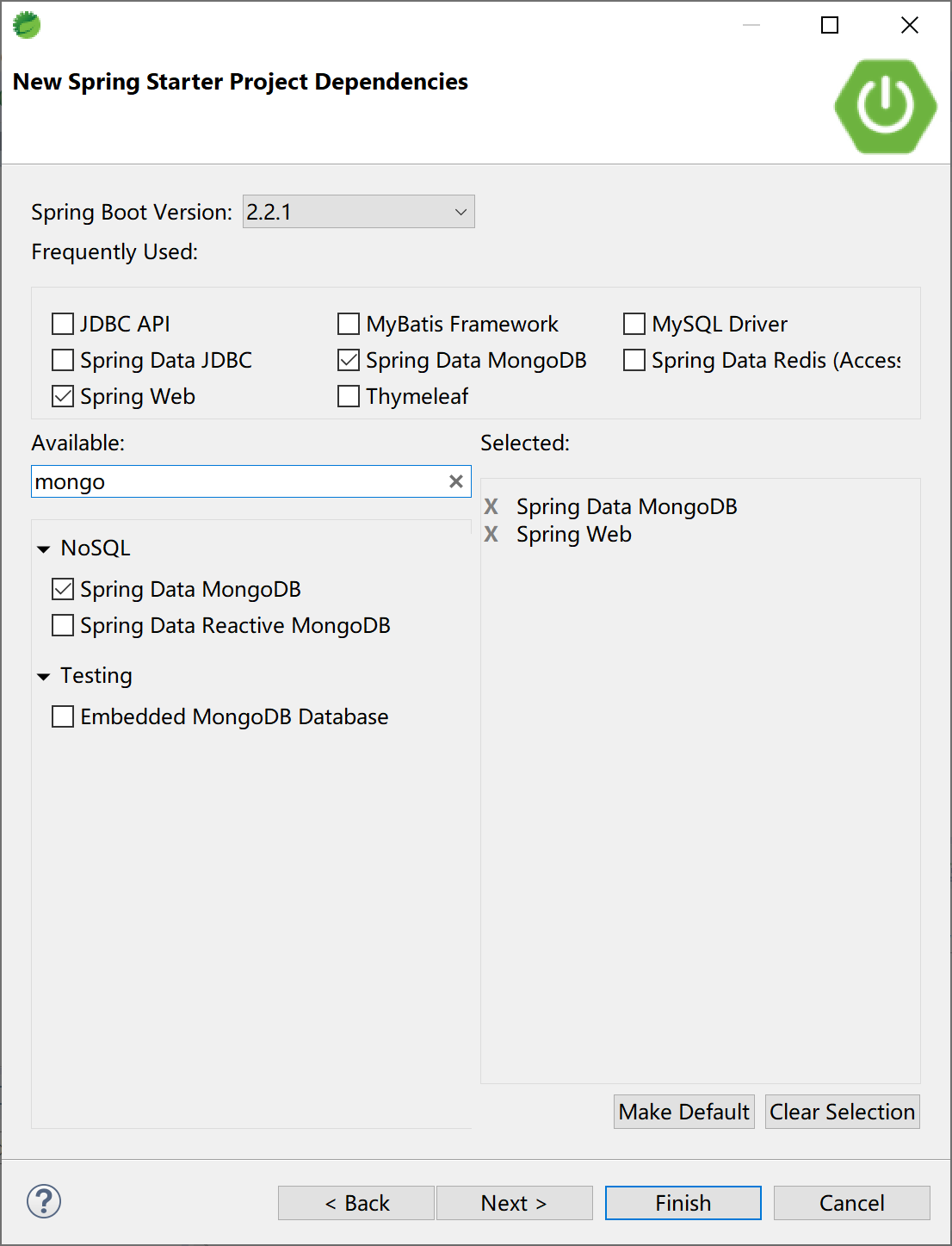
创建的项目中,依赖的启动器(starter)如下:
<dependency>
    <groupId>org.springframework.boot</groupId>
    <artifactId>spring-boot-starter-data-mongodb</artifactId>
</dependency>
<dependency>
    <groupId>org.springframework.boot</groupId>
    <artifactId>spring-boot-starter-web</artifactId>
</dependency>
在application.yml配置文件中配置MongoDB的连接信息,连接到本地MongoDB服务器。
spring:
  application:
    name: spirng-boot-mongodb
  data:
    mongodb:
      host: localhost
      port: 27017
      database: test
后续,我们将使用在上一小节中创建的Test数据库中的User集合(Collection)来完成代码示例。
8.2.2 使用MongoTemplate
在entity包下创建User实体类,对应User集合中的文档。
public class User {

    private String id;
    private String name;
    private int age;
...
我们在示例中提供3个字段:id,name和age。
在service包下创建服务类UserService,其中提供针对User的增删改查功能。
package com.example.mongodb.service;

import java.util.List;

import org.springframework.beans.factory.annotation.Autowired;
import org.springframework.data.mongodb.core.MongoTemplate;
import org.springframework.data.mongodb.core.query.Criteria;
import org.springframework.data.mongodb.core.query.Query;
import org.springframework.data.mongodb.core.query.Update;
import org.springframework.stereotype.Service;

import com.example.mongodb.entity.User;

@Service
public class UserService {

    @Autowired
    private MongoTemplate mongoTemplate;

    public String save(String id, String name, int age) {
        User user = new User();
        user.setId(id);
        user.setName(name);
        user.setAge(age);

        mongoTemplate.save(user);
        return "success";
    }

    public List<User> findAll() {
        return mongoTemplate.findAll(User.class);
    }

    public User get(String id) {
        Query query = new Query(Criteria.where("_id").is(id));
        return mongoTemplate.findOne(query, User.class);
    }

    public String update(String id, String name, int age) {
        User user = new User();
        user.setId(id);
        user.setName(name);
        user.setAge(age);

        Query query = new Query(Criteria.where("_id").is(id));
        Update update = new Update().set("name", name).set("age", age);
        mongoTemplate.updateFirst(query, update, User.class);
        return "success";
    }

    public String delete(String id, String name, int age) {
        User user = new User();
        user.setId(id);
        user.setName(name);
        user.setAge(age);

        mongoTemplate.remove(user);
        return "success";
    }
}
上述代码中的17-18行注入MongoTemplate类,后续就使用这个模板类完成CRUD的操作。
控制器类,UserController提供了一些url与浏览器交互。
为了方便测试,我们这里不使用post提交表单的方式,而通过get方式附加url参数的形式和后台交互。
package com.example.mongodb.controller;

import java.util.List;

import org.springframework.beans.factory.annotation.Autowired;
import org.springframework.web.bind.annotation.RequestMapping;
import org.springframework.web.bind.annotation.RestController;

import com.example.mongodb.entity.User;
import com.example.mongodb.service.UserService;

@RestController
@RequestMapping("/mongodb/user/")
public class UserController {

    @Autowired
    UserService userService;

    @RequestMapping("/save")
    public String save(String id, String name, int age) {
        return userService.save(id, name, age);
    }

    @RequestMapping("/findAll")
    public List<User> findAll() {
        return userService.findAll();
    }

    @RequestMapping("/get")
    public User get(String id) {
        return userService.get(id);
    }

    @RequestMapping("/update")
    public String update(String id, String name, int age) {
        return userService.update(id, name, age);
    }

    @RequestMapping("/delete")
    public String delete(String id, String name, int age) {
        return userService.delete(id, name, age);
    }

}
运行这个Spring Boot应用,通过浏览器测试验证针对MongoDB的增删改查功能。
新增:http://localhost:8080/mongodb/user/save?id=1&name=Kevin&age=18,结果如下:
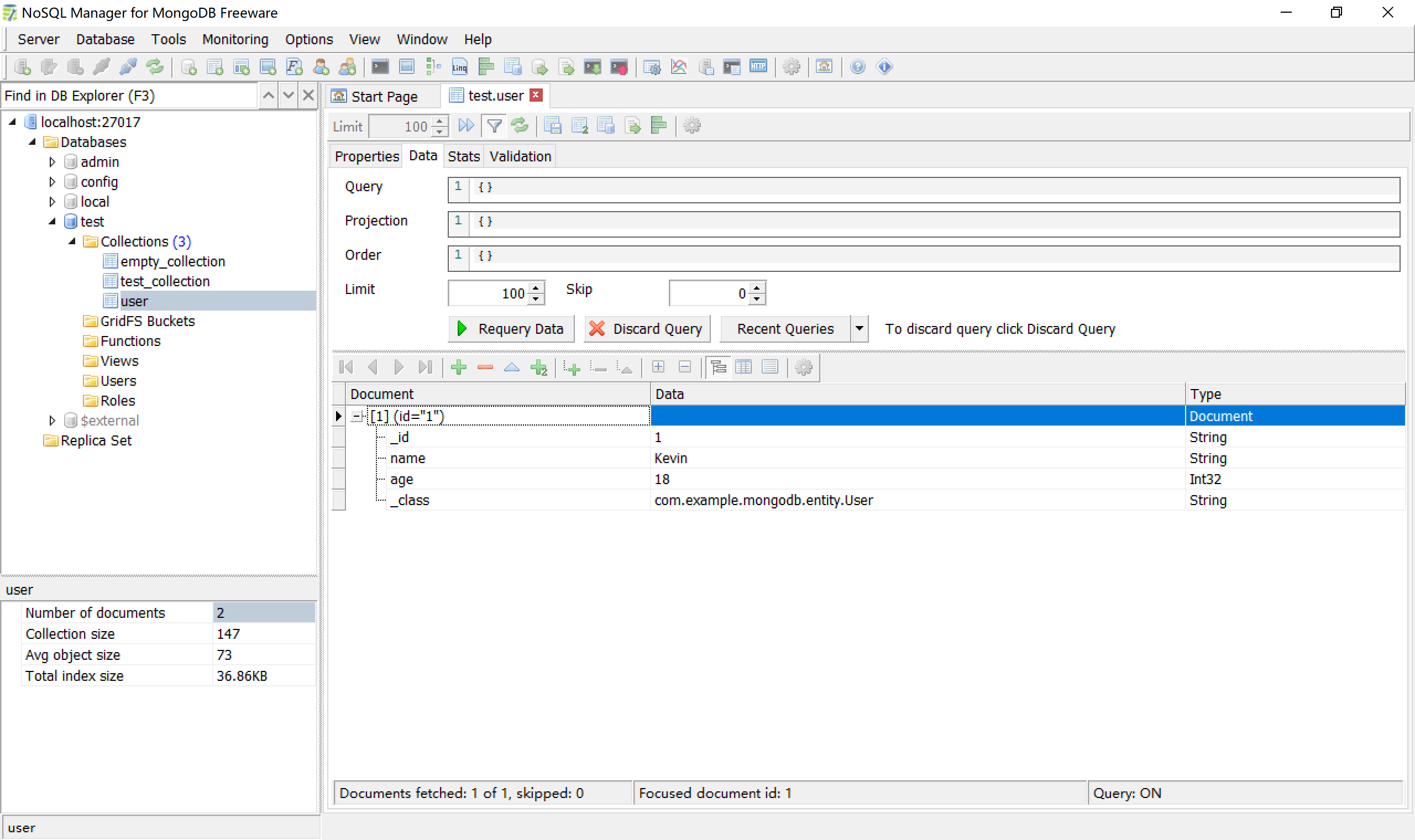
查找单一记录:http://localhost:8080/mongodb/user/get?id=1,结果如下:

再通过http://localhost:8080/mongodb/user/save?id=2&name=Roy&age=8,增加另外一条记录。
查找所有的记录:http://localhost:8080/mongodb/user/findAll,结果如下:

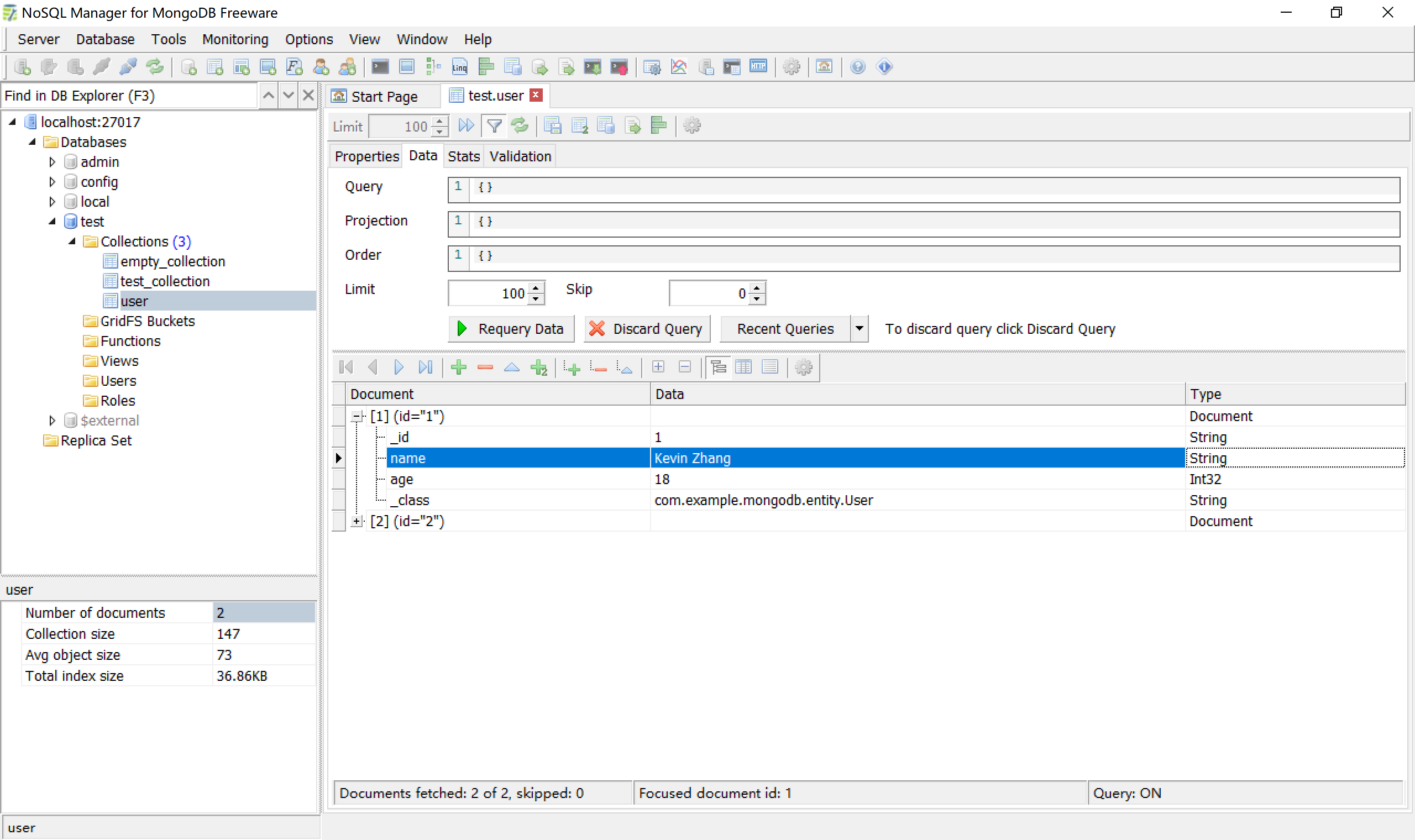
修改id=1的记录:http://localhost:8080/mongodb/user/update?id=1&name=Kevin%20Zhang&age=18,结果如下(注意查看第1条记录的name字段的值):
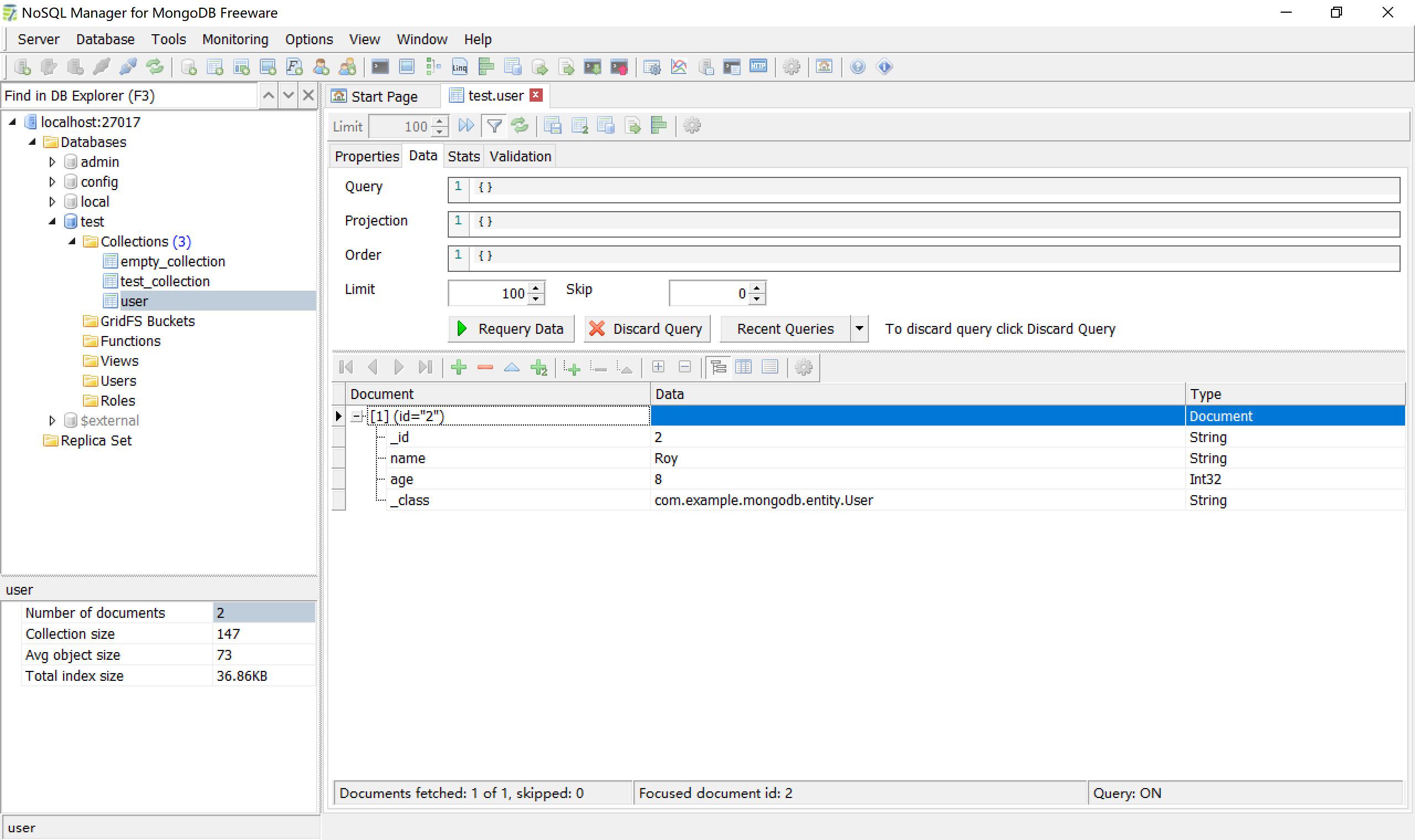
删除记录:http://localhost:8080/mongodb/user/delete?id=1&name=Kevin%20Zhang&age=18,结果如下(id=1的那条记录已经被删除了):
8.2.3 使用MongoRepository
Spring Data提供了针对MongoDB的,与JPA规范保持一致的操作接口。
Supported keywords inside method names
| Keyword | Sample | JPQL snippet |
|---|---|---|
And |
findByLastnameAndFirstname |
… where x.lastname = ?1 and x.firstname = ?2 |
Or |
findByLastnameOrFirstname |
… where x.lastname = ?1 or x.firstname = ?2 |
Is, Equals |
findByFirstname,findByFirstnameIs,findByFirstnameEquals |
… where x.firstname = ?1 |
Between |
findByStartDateBetween |
… where x.startDate between ?1 and ?2 |
LessThan |
findByAgeLessThan |
… where x.age < ?1 |
LessThanEqual |
findByAgeLessThanEqual |
… where x.age <= ?1 |
GreaterThan |
findByAgeGreaterThan |
… where x.age > ?1 |
GreaterThanEqual |
findByAgeGreaterThanEqual |
… where x.age >= ?1 |
After |
findByStartDateAfter |
… where x.startDate > ?1 |
Before |
findByStartDateBefore |
… where x.startDate < ?1 |
IsNull, Null |
findByAge(Is)Null |
… where x.age is null |
IsNotNull, NotNull |
findByAge(Is)NotNull |
… where x.age not null |
Like |
findByFirstnameLike |
… where x.firstname like ?1 |
NotLike |
findByFirstnameNotLike |
… where x.firstname not like ?1 |
StartingWith |
findByFirstnameStartingWith |
… where x.firstname like ?1 (parameter bound with appended %) |
EndingWith |
findByFirstnameEndingWith |
… where x.firstname like ?1 (parameter bound with prepended %) |
Containing |
findByFirstnameContaining |
… where x.firstname like ?1 (parameter bound wrapped in %) |
OrderBy |
findByAgeOrderByLastnameDesc |
… where x.age = ?1 order by x.lastname desc |
Not |
findByLastnameNot |
… where x.lastname <> ?1 |
In |
findByAgeIn(Collection ages) |
… where x.age in ?1 |
NotIn |
findByAgeNotIn(Collection ages) |
… where x.age not in ?1 |
True |
findByActiveTrue() |
… where x.active = true |
False |
findByActiveFalse() |
… where x.active = false |
IgnoreCase |
findByFirstnameIgnoreCase |
… where UPPER(x.firstame) = UPPER(?1) |
在dao包下创建UserDAO接口,并给出符合上述命令规范的方法,如findByNameLike方法。
package com.example.mongodb.dao;

import org.springframework.data.domain.Page;
import org.springframework.data.domain.Pageable;
import org.springframework.data.mongodb.repository.MongoRepository;

import com.example.mongodb.entity.User;

public interface UserDAO extends MongoRepository<User, String> {
    public Page<User> findByNameLike(String name, Pageable pageable);
}
创建控制器RepositoryController,注入UserDAO,添加控制器方法。
package com.example.mongodb.controller;

import org.springframework.beans.factory.annotation.Autowired;
import org.springframework.data.domain.Page;
import org.springframework.data.domain.PageRequest;
import org.springframework.web.bind.annotation.RequestMapping;
import org.springframework.web.bind.annotation.RestController;

import com.example.mongodb.dao.UserDAO;
import com.example.mongodb.entity.User;

@RestController
@RequestMapping("/mongodb/repository/")
public class RepositoryController {

    @Autowired
    UserDAO userDAO;

    @RequestMapping("/createUser")
    public User createUser(User user) {
        return userDAO.save(user);
    }

    @RequestMapping("/findByNameLike")
    public Page<User> findByNameLike(String name) {
        PageRequest pageable = PageRequest.of(0, 10);
        return userDAO.findByNameLike(name, pageable);
    }
}
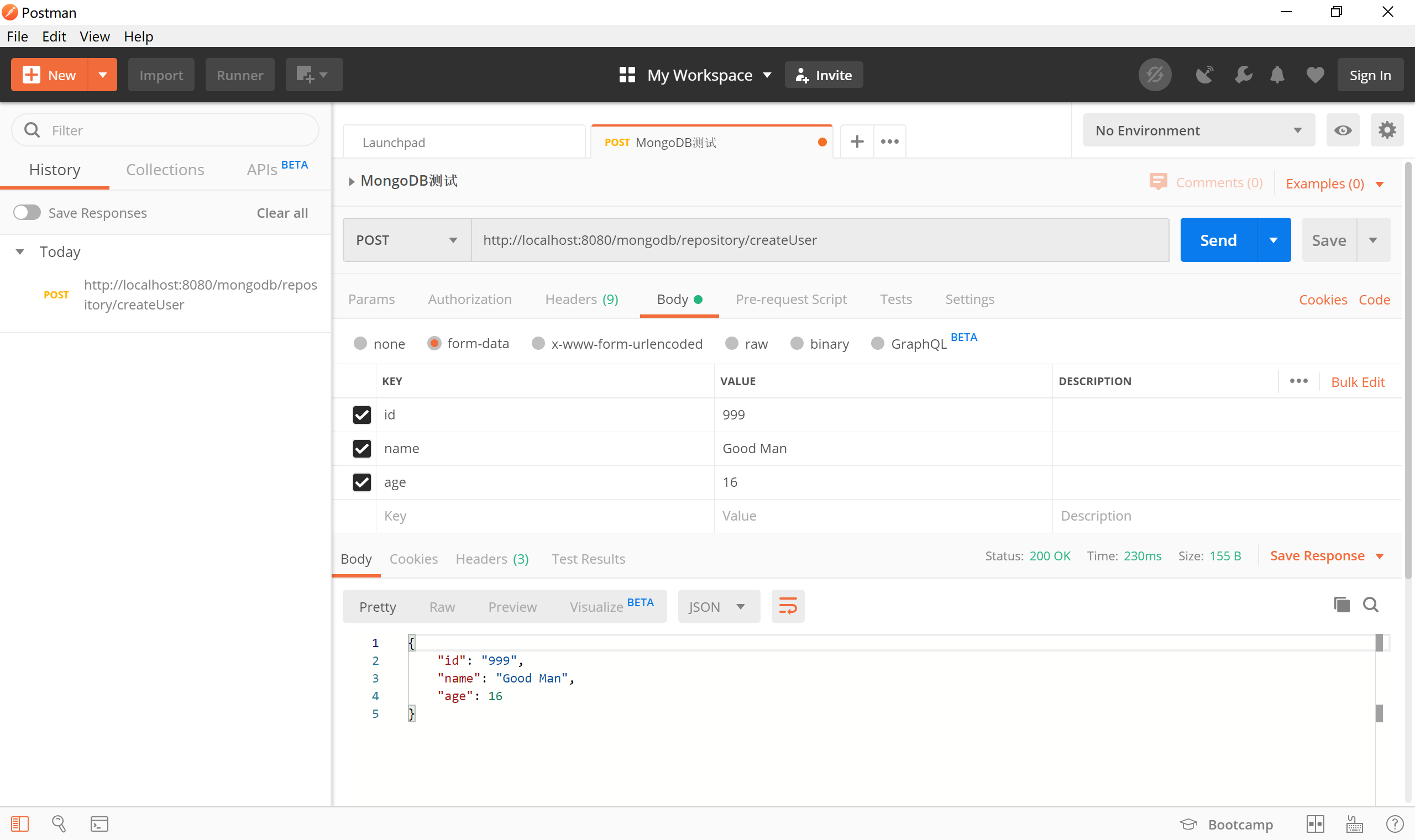
其中的createUser方法使用了org.springframework.data.repository.CrudRepository接口中的save方法。
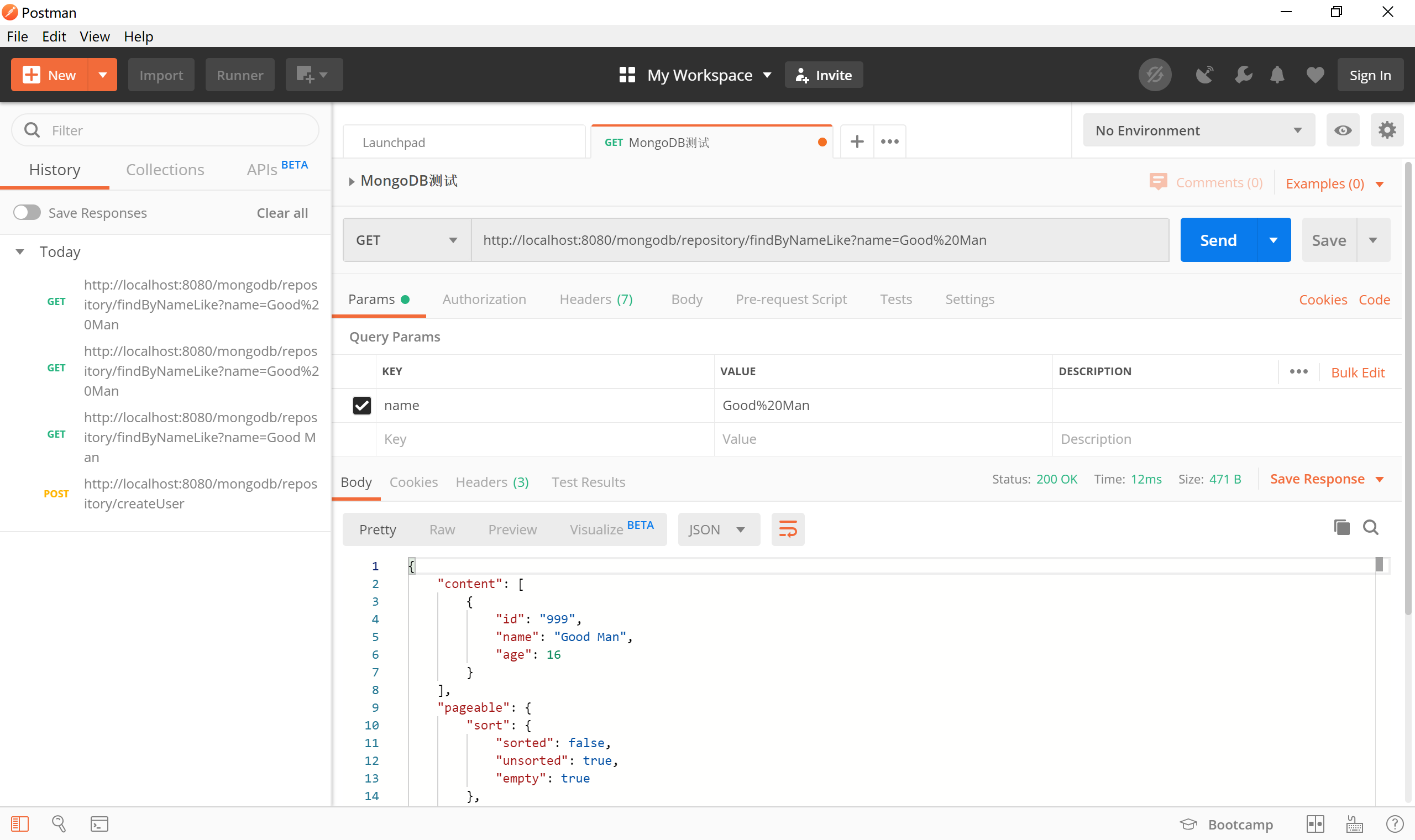
其中findByNameLike方法使用的是我们遵循Spring Data JPA方法名规范在UserDAO类中提供的findByNameLike(name, pageable)方法。
运行程序,使用Postman测试,createUser服务接口:
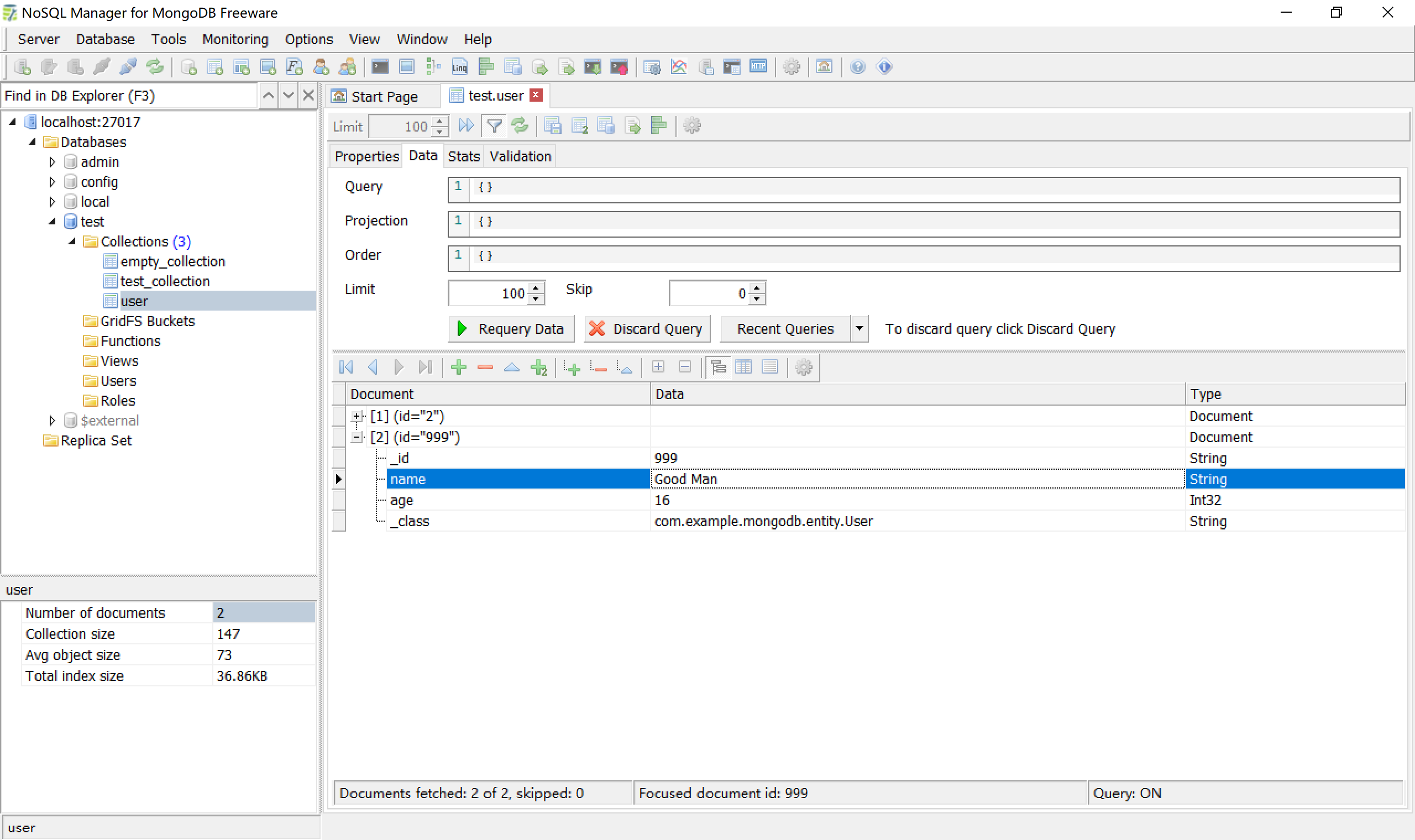
检查MongoDB中的数据,确认其已经正确创建id为999的记录。
通过浏览器访问http://localhost:8080/mongodb/repository/findByNameLike?name=Good Man,检查是否正确返回查询到的数据。

通过Postman发起get请求,请求地址为http://localhost:8080/mongodb/repository/findByNameLike?name=Good Man,检查其返回的数据为id=999的记录。
本小节示例项目代码:
https://github.com/gyzhang/SpringBootCourseCode/tree/master/spring-boot-mongodb